
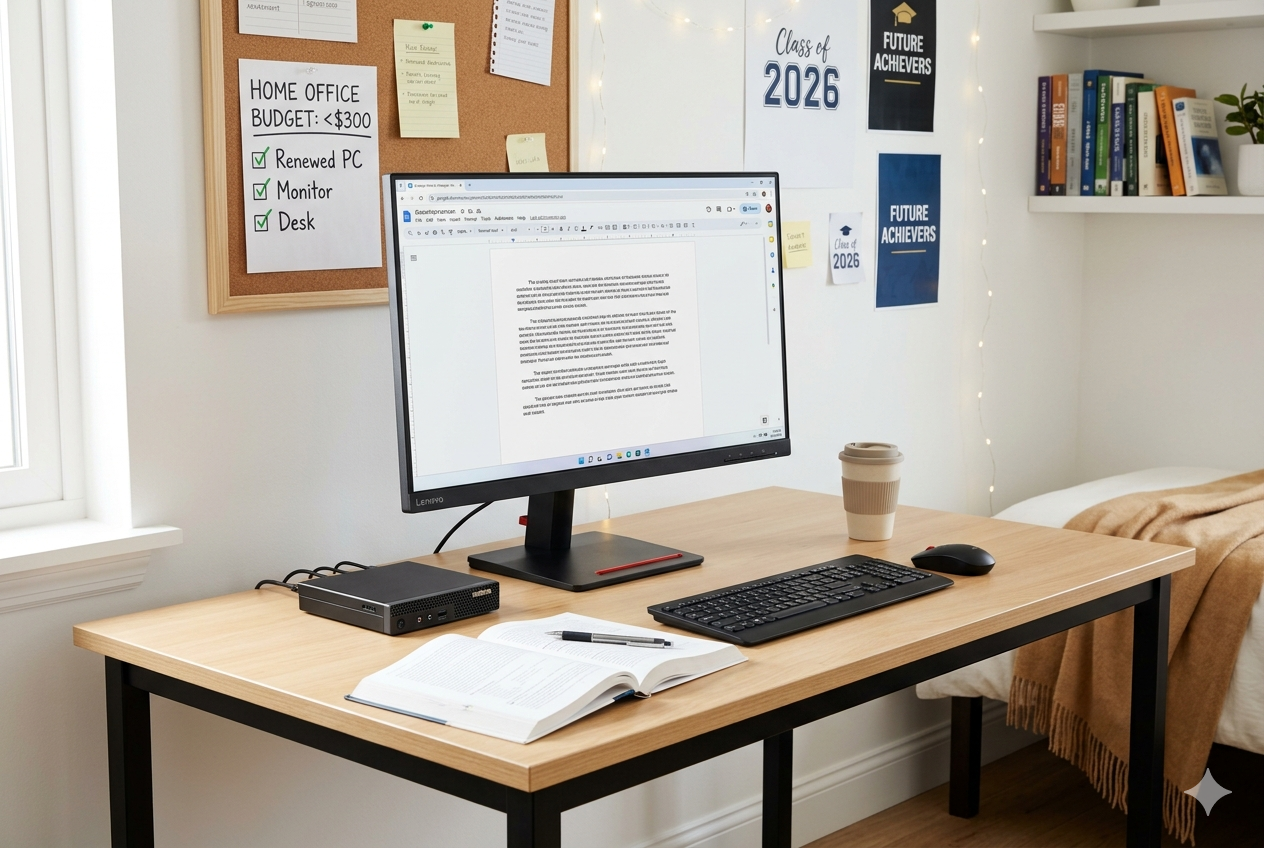
Let’s be real: trying to work on a project while slouched over a messy bed or sitting on a rock-hard kitchen chair is a nightmare. Not only does it crush your ability to focus, but it also takes its toll on your neck and lower back. Studies in workplace ergonomics consistently show that setting up a dedicated, physically supportive workspace directly prevents chronic neck strain and keeps your energy up during brutal study blocks.
The good news? You do not need an influencer-sized bank account to build an epic workspace. With a hard limit of $300, you can craft a clean, high-performance workstation that looks aesthetic and keeps you comfortable.
Based on hours of scouring corporate liquidation sales, testing budget gear, and pulling the best data from Reddit’s r/battlestations community, here is the ultimate blueprint to stretch your dollar.
The Master Setup Strategy: Where to Spend vs. Where to Save
When you are on a tight budget, you have to treat your money like a tactical video game loadout. Do not waste cash on flashy RGB light strips or expensive branded desk pads first. Focus on the core pillars of productivity: support, surface, and screen.
To give you the most value, we have mapped out two distinct setups depending on what you currently own.
Setup Blueprint 1: The “Zero to Hero” Build (Includes a Computer!)
Best for: People who do not own a reliable computer yet and need a full desktop rig from scratch.
| Component | Target Item Type | Cost | Why It’s Selected |
| Computer | Renewed Mini PC (Intel N100 or i5) | $130 | True desktop power in a box the size of a book. |
| Monitor | Renewed 22-inch 1080p Monitor | $60 | Massive screen real estate boost over a phone/tablet. |
| Desk | Minimalist 40-inch Z-Frame Desk | $40 | Heavy-duty steel frame that won’t wobble during typing. |
| Chair | Mid-Back Mesh Ergonomic Task Chair | $50 | Breathable back material to keep you cool during summer cram sessions. |
| Peripherals | Logitech MK270 Wireless Combo | $20 | Low-latency mouse and keyboard that clears cable clutter. |
| Total Cost | $300 | A complete desktop ecosystem ready to work. |
Spotlight: The Ultimate Budget Office Computer
If you choose Setup 1, your absolute best secret weapon is a Renewed Lenovo ThinkCentre M710q Tiny PC (or a budget GMKtec G3 Pro Mini PC).
+------------------------------------------+
|      Lenovo ThinkCentre Tiny PC Spec     |
+------------------------------------------+
| Core: Intel i5 Quad-Core                 |
| RAM: 8GB / 16GB DDR4                     |
| Storage: 256GB - 512GB NVMe SSD          |
| OS: Windows 11 Pro                       |
+------------------------------------------+
You can routinely find these enterprise-grade mini-machines on Amazon Renewed for anywhere between $120 and $140. Because these computers were originally engineered for corporate offices, they are incredibly durable, easily upgradeable, and pack more than enough power to effortlessly handle 30+ open Chrome tabs, heavy Google Docs editing, coding assignments, and 1080p video streaming. They tuck neatly behind your monitor, completely saving your desk space.
Setup Blueprint 2: The “Laptop Level-Up” Build
Best for: Users who already use a laptop for class but want to convert their bedroom corner into a high-yield study den.
If you already have a laptop, you can reallocate that computer budget directly into high-end comfort and massive screen real estate:
- The Ultrawide Screen ($110): Grab a renewed 27-inch 1080p IPS display. Having your textbook open on one half of the screen and your essay draft open on the other will literally cut your homework time in half.
- The Ergonomic Throne ($85): Spend more on a high-back office chair with explicit lumbar support and adjustable armrests. Your lower back will thank you when you’re pulling a late-night study session.
- The Sleek Foundation ($65): Upgrade to a wider 47-inch minimalist desk with a clean wooden finish and integrated iron storage hooks.
- The Posture Fixers ($40): Buy an adjustable aluminum laptop riser ($15) to lift your laptop screen directly to eye level. Pair it with a budget wireless keyboard and mouse combo ($25) to keep your wrists flat and neutral.
- Total Cost: $300
Hacks to Crush the $300 Budget
To truly get maximum value out of a double-digit price point, stop buying everything brand new at retail price. Use these insider clever entrepreneur strategies:
- Take advantage of Corporate Offloads: Massive companies replace their office furniture every few years. Search your local Facebook Marketplace or OfferUp for phrases like “office closing,” “moving sale,” or “desk clearance.” You can frequently secure high-end commercial desks for $20 that would cost $150 brand new.
- Trust Amazon Renewed / Back Market: Refurbished enterprise gear comes backed by strong 90-day guarantees. Monitors and mini PCs do not have moving parts that wear down easily, making them the safest budget tech bets on the planet.
- The DIY Riser Trick: If you run out of cash for a monitor arm or laptop stand, do not sweat it. Stack two thick textbooks cleanly underneath your display. It achieves the same ergonomic benefit for $0.
Final Verdict
Building a space that helps you ace your classes doesn’t require a premium budget. By intentionally picking a powerful, renewed machine like a Lenovo ThinkCentre Tiny PC and pairing it with smart, stable furniture basics, you create an optimized launchpad for your aspirational home office setup goals without touching your hard-earned money. Pick your layout, source your parts smartly, and build your ultimate home office den today!

Leave a Reply