
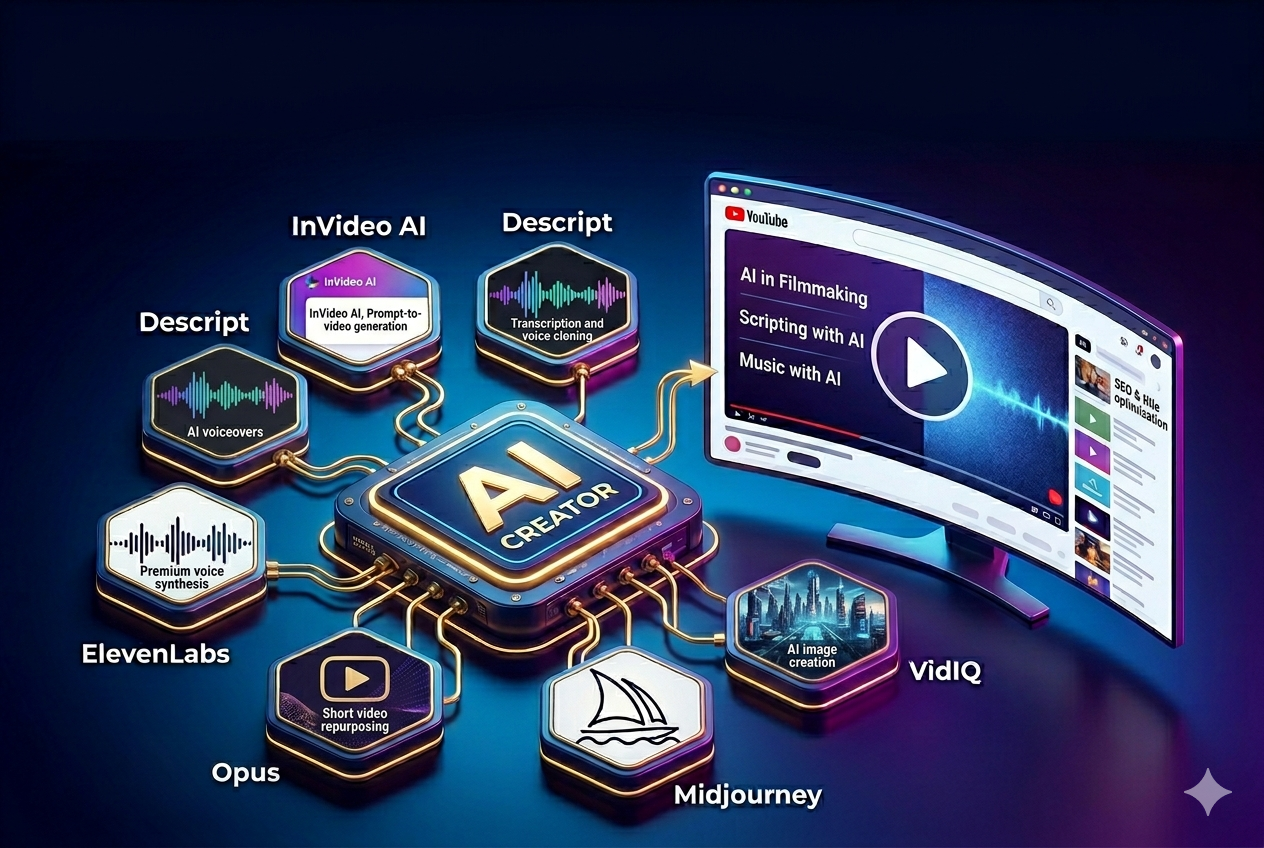
The YouTube landscape has shifted dramatically. A few years ago, growing a channel required expensive camera gear, a professional lighting setup, and hours of tedious editing. Today, the creator economy—and corporate video marketing—is driven by artificial intelligence.
As a digital marketing consultant specializing in performance marketing and MarTech integration, I look at content creation through a very specific lens: measurable ROI. In my work driving digital acquisition for major BFSI brands and building scalable marketing engines for B2B SaaS platforms, video is often the most expensive bottleneck. Whether you are running a highly profitable faceless channel, clipping podcasts to scale organic reach, or testing video creatives across Google and Meta, AI tools for creating YouTube videos are the key to reducing your Customer Acquisition Cost (CAC) while maximizing output.
In this comprehensive skyscraper guide, we will break down the absolute best AI video generators, editors, voiceover software, and SEO assistants available today. By the end of this article, you will have a complete, cost-effective AI tech stack to dominate the YouTube algorithm and turn video views into measurable growth.
⚡ Quick Answer: The Best AI Tools for YouTube at a Glance
Short on time? Here is the “TL;DR” breakdown of the best AI tools for creating YouTube videos based on specific strategic needs:
- Best Overall for Complete Video Generation: InVideo AI (Generates scripts, voiceovers, and stock footage from a single text prompt—perfect for rapid creative testing).
- Best for Faceless YouTube Channels: Pictory (Incredible at turning long blog posts or landing page copy into engaging b-roll heavy videos).
- Best for Repurposing Long-Form Content: Opus Clip (Automatically chops long webinars or podcasts into viral YouTube Shorts to scale organic top-of-funnel reach).
- Best for AI Voiceovers: ElevenLabs (The undisputed king of hyper-realistic, human-sounding AI voices).
- Best for Video Editing: Descript (Edits video exactly like a text document and removes filler words automatically).
📊 Comparison Table: Top AI YouTube Tools
| Tool Name | Core Function | Starting Price (USD) | Best Feature | Difficulty Level |
| InVideo AI | Text-to-Video Generation | $20/month | Prompt-to-publish video creation | Beginner |
| Pictory | Script/URL to Video | $19/month | Auto-syncs b-roll to text | Beginner |
| Descript | AI Video Editing | $12/month | Text-based editing & Overdub | Intermediate |
| Opus Clip | Long-to-Shorts Repurposing | $15/month | Viral score prediction | Beginner |
| ElevenLabs | AI Voice Generation | $5/month | Voice cloning & emotional range | Beginner |
| Midjourney | AI Thumbnail Generation | $10/month | Photorealistic image synthesis | Advanced |
| VidIQ / TubeBuddy | AI YouTube SEO & Titles | Free / $10/mo | Keyword volume & competitor tracking | Intermediate |
🛠️ Detailed Sections: The Ultimate AI Creator Stack
To build a successful channel or video marketing campaign, you need to look at YouTube creation as a pipeline: Ideation & Scripting → Video Generation & Editing → Voiceover → Packaging (Thumbnails & SEO).
When integrating these into your MarTech stack, the goal is 1-to-1 personalization at scale. Here are the best tools for every stage of that pipeline.
1. Best AI Tools for YouTube Ideation & Scripting
Before you can edit a video, you need a killer idea and a script engineered for retention. In performance marketing, we rely on deep data attribution; your script needs to be just as targeted.
ChatGPT (GPT-4o) & Claude 3.5 Sonnet
Large Language Models (LLMs) are the backbone of YouTube pre-production. Claude 3.5 Sonnet is currently favored for its natural, conversational tone, making it perfect for educational YouTube scripts. ChatGPT excels at rapidly brainstorming 50+ video ideas mapped to specific search intents.
- Expert SEO Tip: Don’t just ask AI to “write a YouTube script.” Give it a structural framework. Prompt it with: “Act as an expert performance marketer and YouTube scriptwriter. Write a 5-minute script about [Topic]. Use the ‘Hook, Intro, Value, Call-to-Action’ framework. Keep the tone conversational, use short sentences, and include visual cues for b-roll in brackets.”
- Pricing: Free tiers available; Pro tiers around $20/month.
2. Best AI Text-to-Video Generators
If you need to produce a high volume of video assets for testing without the overhead of a full production team, these tools generate the entire visual experience.
InVideo AI
InVideo AI is arguably the most powerful prompt-to-video tool on the market. You type a prompt like, “Create a 3-minute video explaining CDP integration for SaaS founders, narrated by a professional voice, using corporate cinematic stock footage,” and the AI handles the rest.
- Pros: Incredible ease of use; lets you iterate rapidly, which is crucial when testing different hooks to lower CAC.
- Cons: Highly technical B2B topics may yield slightly generic stock footage.
- Best For: Faceless channels, rapid ad-creative generation, and top-of-funnel educational content.
Pictory
Pictory specializes in converting long-form text into video. If you already have a high-ranking blog post on your site, you simply paste the URL into Pictory. The AI highlights the most important sentences and automatically stitches together royalty-free video clips that match the context of your words.
- Pros: Massive library of Storyblocks footage; excellent automated subtitling.
- Cons: The UI can feel restrictive for advanced, timeline-level editing.
- Best For: Turning existing blog content into YouTube videos to capture search traffic across multiple mediums.
3. Best AI Video Editors for YouTube
If you record your own videos or host corporate webinars, AI editors will save you dozens of hours and significantly streamline your workflow.
Descript
Descript has revolutionized video editing. Instead of cutting clips on a complex timeline, Descript transcribes your video. You edit the text document—deleting a sentence in the text automatically deletes that video clip.
- Killer Feature: “Studio Sound” removes all background echo and noise, making a standard microphone sound like a studio setup. It also automatically removes filler words (“um,” “uh”) with one click, keeping viewer retention high.
- Pros: Intuitive for marketers without video editing backgrounds; incredibly fast rough cuts.
- Cons: Not meant for heavy visual effects or complex color grading.
Opus Clip
With the explosion of short-form content, Opus Clip is a mandatory tool for scaling reach. You drop a YouTube link to a 1-hour B2B podcast or vlog into Opus Clip, and it uses AI to analyze the most engaging moments, delivering 10-15 ready-to-post YouTube Shorts.
- Killer Feature: It automatically frames the speaker, adds dynamic captions, and assigns a data-backed “Viral Score” to help you predict performance.
- Best For: Building a scalable content engine by repurposing long-form assets into high-volume Shorts.
4. Best AI Voiceover Generators
The robotic “text-to-speech” voices of the past are dead. Today’s AI voices breathe, pause, and express emotion, allowing you to maintain brand trust.
ElevenLabs
ElevenLabs is the undisputed industry leader for AI audio. Its text-to-speech engine produces voices that are virtually indistinguishable from real human actors. You can adjust stability, clarity, and style exaggeration.
- Pros: Hyper-realistic; supports voice cloning (you can train it on your own voice so the AI can narrate your channel as you, saving hours of recording time).
- Cons: Can become pricey if generating long-form documentaries regularly.
Murf.AI
Murf is a close competitor, but it shines in its user interface and collaboration features. It offers specific voice profiles tailored for distinct content (e.g., “Educator,” “Authoritative,” “Conversational”) and lets you sync the audio with visuals directly in the app.
5. Best AI Tools for Thumbnails & SEO
In performance marketing, the thumbnail and title are your ad creatives; if the CTR is low, the video fails. AI takes the guesswork out of this process.
Midjourney v6
For custom, highly clickable thumbnails, Midjourney is unmatched. Instead of searching for stock photos, you can prompt Midjourney to create exactly what you need.
- Expert Tip: Generate the base image in Midjourney, then bring it into Canva or Photoshop to add bold text, contrast, and your minimalist brand elements. A clean, professional look drives higher trust and CTR.
VidIQ (AI Features)
VidIQ has integrated deep AI features to help creators hack the YouTube algorithm. Their AI Title Generator analyzes competitors and search trends to spit out highly clickable titles. Their AI description generator ensures your videos are perfectly optimized to capture high-intent search traffic.
❓ Frequently Asked Questions (FAQs)
Can I monetize a YouTube channel that uses AI videos?
Yes. YouTube’s monetization policies allow AI content, provided it is transformative and provides value. If you upload raw AI-generated text over robotic audio with zero editing, you will be flagged as spam. However, if you use AI to craft a well-researched, highly edited video with a realistic AI voiceover, you can absolutely be monetized.
What is the best free AI tool for YouTube creators?
For scripting and structuring, ChatGPT (Free Version) is unbeatable. For editing and basic automatic captions, CapCut offers incredibly powerful AI features (like background removal and auto-framing) entirely for free.
Does the YouTube Algorithm penalize AI-generated content?
No. The YouTube algorithm follows audience behavior. The algorithm does not throttle reach just because an AI made the video. If an AI-generated video has a high Click-Through Rate (CTR) and high Average View Duration (AVD), YouTube will push it to millions. The data is all that matters.
Can AI completely replace video editing?
Not yet. While tools like InVideo and Opus Clip are amazing, they are best viewed as “rough cut” generators. To truly stand out—especially when representing a professional brand or high-value consultancy—a human touch for pacing, sound design, and narrative flow is still required.
⚖️ Final Verdict: Which AI YouTube Tools Should You Choose?
Building your AI YouTube stack comes down to your strategic goals:
- For Consultants & Educators (Face-on-Camera): Use ChatGPT for scripting, Descript to edit your footage rapidly, and VidIQ to ensure your content captures high-value search intent.
- For Scalable Faceless Channels: Combine InVideo AI for video generation, ElevenLabs for a premium voiceover, and Midjourney to create eye-catching thumbnails.
- For Maximizing Content ROI (Shorts): Record long-form foundational videos or podcasts and run them through Opus Clip to build an automated, top-of-funnel marketing engine.
The AI revolution in video creation is not about replacing creators or marketers; it is about empowering us to scale our output. By integrating these AI tools into your workflow, you can drastically reduce production bottlenecks, improve your unit economics, and focus on what actually drives growth: delivering exceptional value to your audience.

Leave a Reply